
For agencies that manage creators
Get the day's content out. See who did the work.
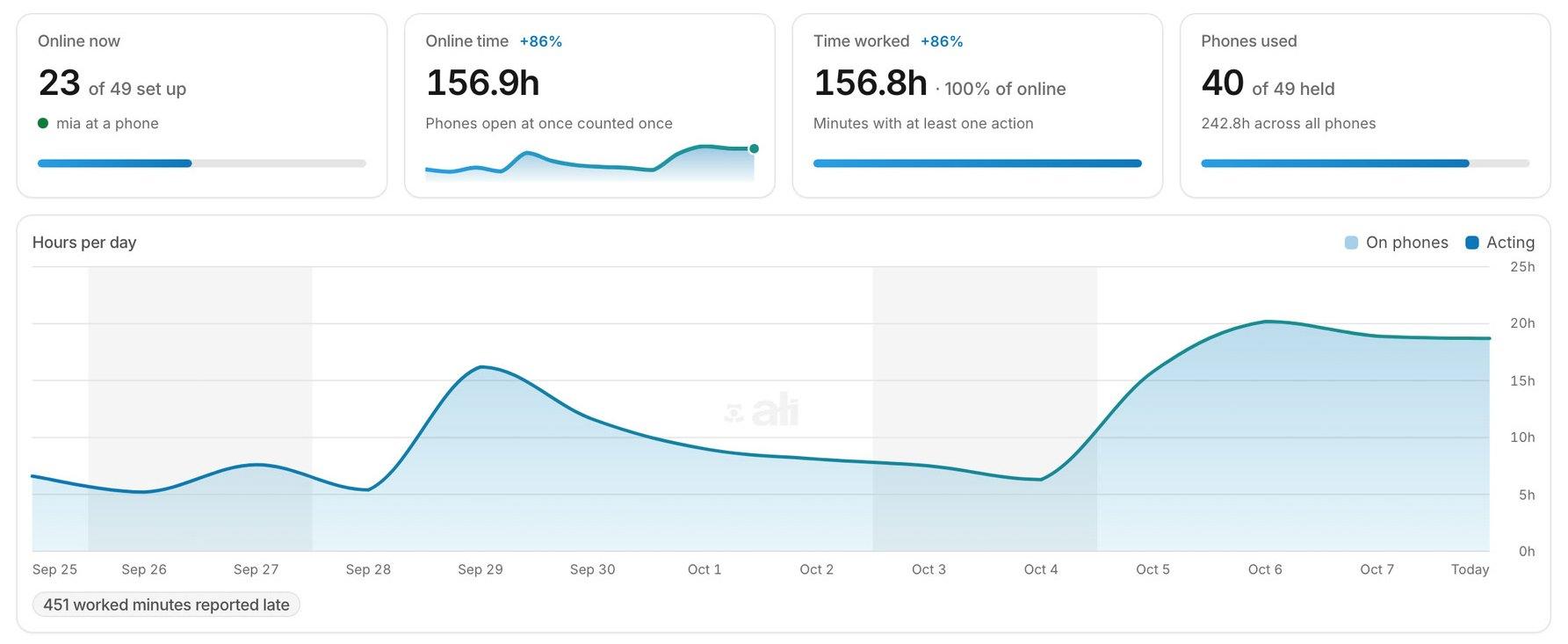
Upload the day's content once, then send it to every creator's iPhones. Choose exactly which iPhones each VA can open, from any browser. You see hours worked against hours online, per teammate.
Built for agencies that run social media for creators and clients.
A team of VAs and account managers, and iPhones that all of them need to reach. Three things slow the day down.
Content lost in chat threads
The day's files travel through chat apps and shared folders. Nobody can tell what has already gone out.
All-or-nothing access
Anyone who can reach the phones can open all of them: every creator, every client.
Online is not the same as working
A status dot tells you who is signed in. It does not tell you who did the work, or for how long.
How agencies run ALI.
Everything you get is already shipped.
Media vault
Upload once, send to any iPhone. Folders, tags and search. Use Mark as posted so the team can see what has already gone out.
Team and roles
A Member sees only the iPhones assigned to them or to their roles, and manages nothing else. This is the right starting point for VAs and operators. Roles with exact permissions, two-factor sign-in for everyone.
Hours worked vs online
Hours worked against hours online, per teammate. So you see who did the work, not just who signed in.
Multi View
Drive many iPhones side by side. Tap, swipe and type from any browser.
API, MCP and automations
Show it once, it keeps doing it. Connect an assistant such as Claude, and over MCP the tools that change something ask for your approval before they run. Use automations only where each app's own terms allow it.
Full remote control
Tap, swipe, type, install apps, take a screenshot. Real iPhone SE units, powered, connected and maintained by us.
Up and running in five steps.
Rent the iPhones you need
Add more whenever you're ready. The price per iPhone falls as your fleet grows.
Sign in to the accounts you manage
You sign into your existing accounts on your ALI iPhone the same way you would on any new phone. Only add accounts you own or are authorized to manage.
Invite your team
Best practice: one account per person, and never a shared login. You do not set a password for them: they choose their own when they accept. Then choose exactly which iPhones each person can open.
Send the day's content
Upload from your computer, then pick the phones to send to.
Check the hours
For hours, sessions and usage over time, open Analytics.
What agencies say.
ALI has been a major upgrade for us.
Every little problem is being fixed fast. The support is incredible. The UI is perfect now. Everything is so fast and it's huge leverage for our business.
ALI is the best remote phone I had used, it's really reliable, love it.
The new infra is great. Other level. It feels smoother and more stable, and the phones seem to be performing better overall. I've also set up the MCP, and I've let go of 3 VAs I had.
Guys, this is a whole different ball game now. So smooth, everything works perfectly. The way you move around the phone. Def top of the line product.
The phones don't glitch, they run smoothly, and that's nice! The MCP with Claude is really useful and helps you avoid time consuming tasks!
Agency questions.
Can a VA open only the iPhones I give them?
Yes. Create accounts for your people, give them roles, and choose exactly which iPhones each person can open.
How do I get the day's content onto the phones?
Through the Media vault: upload once from the dashboard, then send files to any iPhone in your fleet.
Who can see the hours?
You decide. A role is a name for a set of permissions, and analytics is one of them. Tell your team what it records before you start. Many countries require it, and some also require a works council's agreement.
Can an AI assistant change things without asking me?
Not over MCP: the tools that change something ask for your approval before they run. With the API, keys are limited to the actions and the phones you choose.
Do Instagram, TikTok and X work on these iPhones?
Yes. These are real iPhones with the real App Store: Instagram, TikTok, X and anything else run exactly as they would in your hand. You stay responsible for following each app's terms, and for managing only the accounts your creators and clients have authorized you to manage.
Can I see it working before I pay?
Book a discovery call and we'll walk you through a live device before you commit.